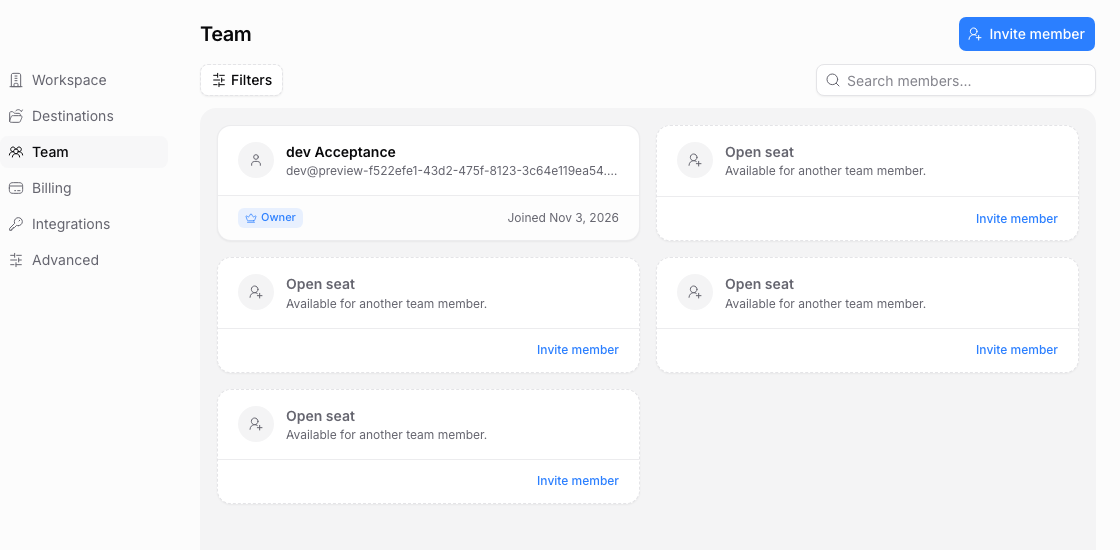
Open Settings > Team to manage workspace members and invitations. Owners and admins can manage the team; only the current owner can transfer ownership.
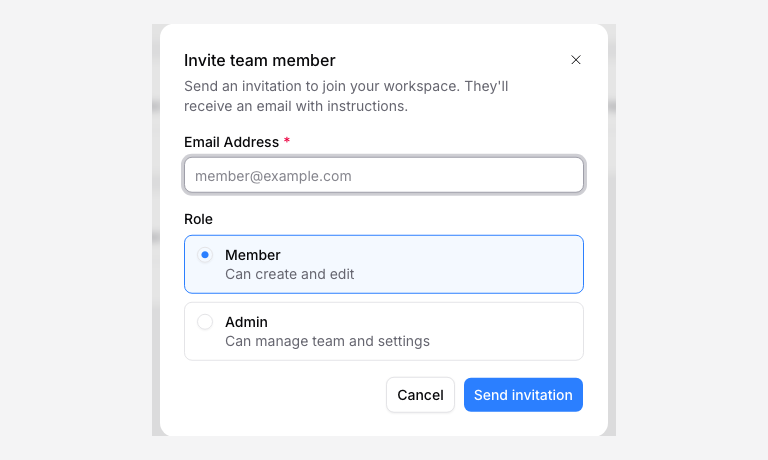
Invite a teammate
- Click Invite member or an available seat’s invite action.
- Enter the teammate’s email address.
- Choose Member or Admin.
- Review any paid-seat confirmation.
- Send the invitation after you have checked the address and role.
Free and Solo include one person. Pro includes three; Agency includes five. On Pro and Agency, an invitation beyond your included capacity may require a paid seat. The app shows the charge and new recurring total before confirmation. The invitation is sent after payment for added capacity is verified. Pending invitations count toward capacity.
Choose a role
| Role | Access |
|---|---|
| Member | Create and manage upload pages and storage connections, view and export submissions, and view billing. |
| Admin | Member access plus team, workspace, billing, integration, and eligible activity management. |
| Owner | Admin access plus workspace deletion and ownership transfer. |
Plan limits still apply. A role does not unlock a paid feature, and workspace access does not grant permission to open a destination file in Google Drive, Dropbox, or OneDrive.
Accept or repair an invitation
The recipient opens the invitation and signs in with the invited email address. If the invitation says it belongs to another account, sign out and use the correct address. For an expired or cancelled invitation, ask an admin to send a replacement.
Admins can use the invitation’s menu to Resend invitation or Cancel invitation. Respect the resend countdown. Check the address and spam folder before sending repeated invitations.
Change access or remove a member
Use the member’s actions menu to Set as admin, Set as member, or Remove member. Review the confirmation. Removal ends workspace access; a paid-capacity reduction has its own billing confirmation and outcome. A billing failure does not restore the removed membership.
If the departing person owns a storage connection, replace the affected file destinations so new uploads can continue.
Transfer ownership
The owner chooses Make owner on the intended existing member and confirms the transfer. Choose someone who should control billing, membership, and deletion. Transfer ownership before deleting your account if the shared workspace must remain available.